
AI Agent · for M365 IT Admins

An agent that governs your agents.

Find duplicates. Promote winners. Retire dead agents. In plain English, inside Microsoft 365 Copilot - built on Microsoft Agent 365.
  • Six labels turn data into decisions
  • Read-only · on-behalf-of · tenant-isolated
  • Per-tenant · on Microsoft AppSource
Requires Microsoft Agent 365 (GA 1 May 2026). $15/admin/month, or included in Microsoft 365 E7. Typically 1-4 admins per tenant.
Agent Control Pro - governance assistant for Microsoft 365 Copilot agents

The reality today

Copilot agents are multiplying. Governance hasn't caught up.

Microsoft 365 tenants are filling up with agents nobody asked for, nobody owns, and nobody can untangle. The admin centre lists them. It doesn't tell you which ones matter.

Sprawl

You don't know what you have.

Agents land via Agent Builder, Copilot Studio, Agents Toolkit, line-of-business code, and shared links. No single view tells you the full footprint.

Duplicates lurking

Three teams built the same agent.

Same purpose, three names, three owners, zero coordination. You'd find out by reading every name and comparing by hand. So you don't.

Decisions on guesswork

Promote what? Retire what?

Picking org-wide candidates means cross-referencing shared-link agents against usage CSVs by hand. Most teams skip the work and pick by hunch.

Dormant risk

Abandoned agents keep their permissions.

Agents with zero use stay live and retain their data connections - quietly adding to your tenant's attack surface.

Microsoft Agent 365 surfaces the data. Agent Control Pro turns it into decisions.

The questions

Four questions every Copilot tenant ends up asking.

Microsoft gives you two spreadsheets. Agent Control Pro gives you the answer - in chat.

1 · Inventory

What agents do I have?


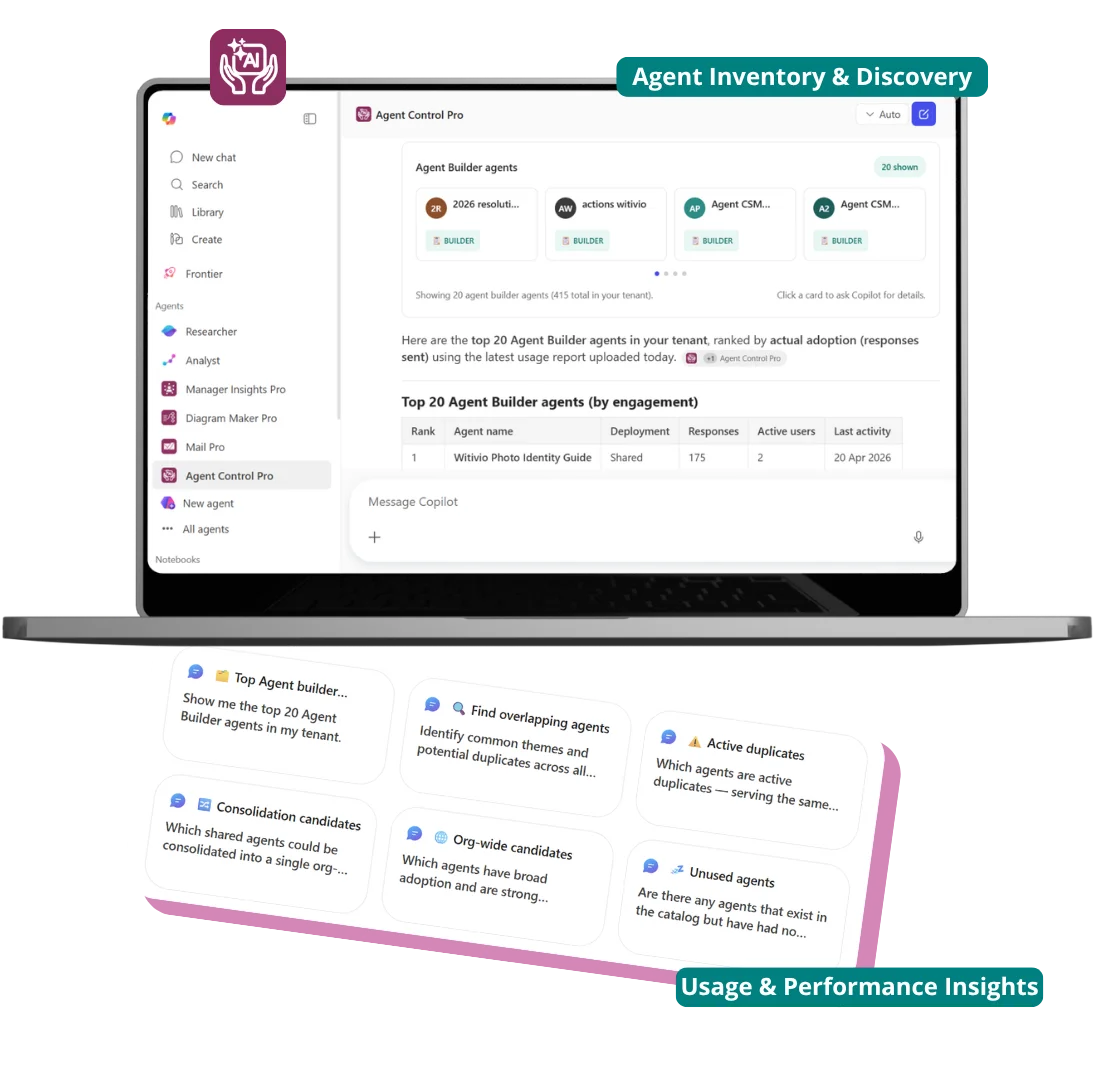
"Show me the top 20 Agent Builder agents."

Get a count, a build-type breakdown, per-team views.

2 · Dedupe

Which overlap or duplicate?


"Which agents are active duplicates?"

Get a classified list with the peer agents and the reason behind every flag.

Active Duplicate Orphaned Duplicate Catalogue Duplicate Fragmented Deployment

3 · Promote

Which deserve org-wide?


"Which shared-link agents should I promote tenant-wide?"

Get the candidates with 50+ active users - promotion on evidence, not hunch.

Org-Wide Candidate

4 · Retire

Which should I retire?


"Are there agents with no usage at all?"

Get the dormant list and the orphaned duplicates, with usage evidence.

Dormant Orphaned Duplicate

Product tour

See it in action - right here

Click through a real Agent Control Pro session: spot duplicates, surface dormant agents, identify org-wide promotion candidates - all from inside Microsoft 365 Copilot. No signup, no install.

Open in a new tab

The impact

Without Agent Control Pro. With Agent Control Pro.

The question
Without Agent Control Pro
With Agent Control Pro
How many agents?
Open admin centre. Count manually.
Ask. Get a count + breakdown.
Which are duplicates?
Read every name. Compare manually.
Ask. Get a classified list with reasons.
Which deserve org-wide?
Cross-reference shared-link agents against usage CSV by hand.
Ask. Get the qualifying candidates.
Which should I retire?
Hope someone tells you.
Ask. Get the dormant list + orphaned duplicates.
Who can use this agent?
Look up users + groups by id.
Ask. Get resolved names and emails.

The foundation

Built on Microsoft Agent 365.

Microsoft Agent 365 (GA 1 May 2026) is the unified registry for every Copilot agent in your tenant. Agent Control Pro reads its signals - registry, identity, lifecycle, audit - and turns them into ranked decisions.

Unified registry

Every agent surface, in one place. Agent Control Pro's classifications get sharper as the registry gets richer.

Identity-bound

Every agent tied to an Entra Agent ID. Agent Control Pro knows precisely who owns and consumes each agent.

Lifecycle + audit signals

Microsoft exposes activity, ownership, state. Agent Control Pro turns those signals into Active, Dormant, Org-Wide Candidate.

Sits alongside Microsoft Purview (data governance) and the Copilot Studio admin centre (custom-engine governance). Doesn't replace them - fills the decision layer none of them does.

Trust

Read-only. On-behalf-of. Tenant-isolated.

Read-only.

Agent Control Pro never deletes, blocks, or reassigns an agent. Recommendations are observations - the destructive action stays in your hands, in Microsoft's own admin tools.

On-behalf-of.

Every read uses the signed-in admin's own delegated Microsoft Graph permissions. No service principal. No shared secret. No back-channel.

Tenant-isolated.

Every record carries your tenant id. The storage layer refuses to return data that doesn't match the calling user's tenant. Hard rule, not convention.

Visit the Witivio Trust Center

Pricing

Per tenant. Not per user. No agent metering.

One subscription covers every administrator in your tenant. Transacted on Microsoft AppSource.

Tenant subscription

Per tenant · unlimited admins · transacted on Microsoft AppSource

Monthly

790 €

per tenant / month

SAVE 1,580 €

Yearly

7,900 €

per tenant / year

  • Unlimited admin users in your tenant
  • Cross-platform inventory: Agent Builder, Copilot Studio, Agents Toolkit, line-of-business, shared-link
  • Six labels: Active Duplicate, Org-Wide Candidate, Dormant, Orphaned Duplicate, Catalogue Duplicate, Fragmented Deployment
  • Read-only · on-behalf-of · tenant-isolated · EU-hosted on Azure

+ Microsoft Agent 365 · ~$15/admin/month, or included in Microsoft 365 E7. Typically 1-4 admins per tenant.
All-in: ≈ €800-850 / month

Witivio is a trusted Microsoft Partner

Available on Microsoft AppSource
Microsoft Partner of the Year
Microsoft IP Co-sell
Microsoft AI Cloud Partner
Microsoft MACC Eligible
Microsoft Azure Marketplace

FAQ

Frequently asked questions

What does Agent Control Pro actually do?
Agent Control Pro is the decision layer on top of Microsoft Agent 365. It joins what agents exist in your tenant with how they are being used, classifies every agent (duplicates, dormant, org-wide candidates, fragmented deployments), and delivers ranked, plain-English answers - inside Microsoft 365 Copilot. No new portal. No spreadsheet reconciliation.
Who is Agent Control Pro for?
Microsoft 365 IT administrators, governance specialists, and digital workplace teams running tenants of 1,000+ seats with Microsoft 365 Copilot. The trigger is the second wave of Copilot rollout - adoption is no longer the question, governance is.
Why does it need a CSV upload? Can't it pull usage live?
The Microsoft 365 Copilot usage report is currently an asynchronous export, not a live API. Treating the upload as an explicit admin action also keeps the trust boundary visible: Agent Control Pro cannot read more usage data than you've given it. You drop the CSV exported from Reports > Usage > Microsoft 365 Copilot > Agents into the small admin portal, and the assistant immediately starts using it. Live ingestion is on the roadmap, behind an explicit per-tenant opt-in.
Is it secure? What data does it read?
Read-only by design. Agent Control Pro never deletes, blocks, or reassigns agents. Every read uses the signed-in admin's own delegated Microsoft Graph permissions - no service principal, no shared secret. Tenants are isolated as a hard rule at the storage layer: every record carries a tenant id, and the storage layer refuses to return data that doesn't match the calling user's tenant. Subscription state changes are only accepted from cryptographically Microsoft-signed marketplace messages. Agent Control Pro never reads the content of any Copilot conversation.
How does it relate to Microsoft Agent 365, Purview, and the Copilot Studio admin centre?
Complementary, on different layers. Microsoft Agent 365 is the foundation - the unified registry, identity, lifecycle and audit signals for every Copilot agent. Microsoft Purview governs the data Copilot agents can touch (DLP, sensitivity, communication compliance). The Copilot Studio admin centre governs custom-engine agents authored in Studio. Agent Control Pro is the decision layer on top of Agent 365 - it turns the registry signals into ranked, classified, deduplicated governance decisions. None of the Microsoft tools fills that decision layer; Agent Control Pro does.
Why do I need Microsoft Agent 365?
Agent 365 is the foundation Agent Control Pro is built on. It provides the unified registry, identity binding, lifecycle and audit signals across every agent surface - Agent Builder, Copilot Studio, Agents Toolkit, line-of-business apps, third-party apps. Agent Control Pro reads those signals and turns them into decisions. The license cost is ~$15 per administrator who uses Agent Control Pro per month, or included in Microsoft 365 E7. Typically 5-15 admins per tenant - it scales with the size of your governance team, not with the user base.
Can I try it before buying?
Yes. Activate a one-month Microsoft Agent 365 trial from the Microsoft 365 admin centre, then activate the Agent Control Pro trial from AppSource - 30 days, per tenant. First governance answers in under a week, no commitment required.
How is it licensed and priced?
Agent Control Pro is sold per tenant on the Microsoft Commercial Marketplace (AppSource): EUR 790 per month or EUR 7,900 per year (saving EUR 1,580 per year). One Agent Control Pro subscription covers every administrator in the tenant - no per-user, per-agent, or consumption metering. Each administrator who uses Agent Control Pro also requires a Microsoft Agent 365 license (~$15/month, or included in Microsoft 365 E7), typically 1-4 admins per tenant. All-in cost: approximately EUR 800-850 per month.

Try it

Try it free. First answers in under a minute.

1

Activate the Agent 365 trial

1 month, from the Microsoft 365 admin centre.

2

Activate the Agent Control Pro trial

30 days, per tenant, on Microsoft AppSource.

3

Ask your first question

Same day. No commitment.

Get it on Microsoft AppSource Book a demo