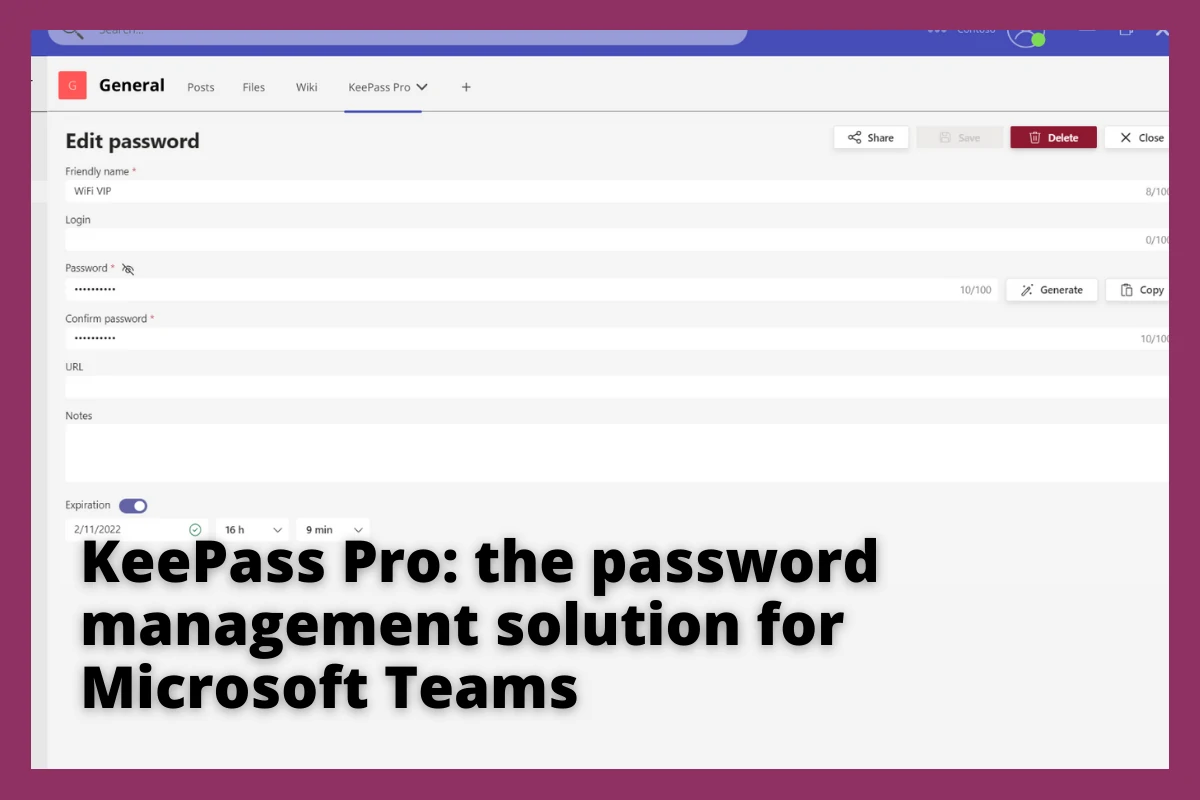

Someone asks for the guest Wi-Fi key in a channel. You paste it, and an hour later you delete the message. Most teams share passwords in Microsoft Teams like that and believe the delete button undid it, but Microsoft's own documentation says otherwise.
- Teams stores a copy of every chat message in a hidden Exchange mailbox folder for every person in that chat.
- Add someone to the chat next month and Microsoft copies the whole history into their mailbox, original dates intact.
- Removing it later means a Purview hard purge: irreversible, billed, and blocked by a hold.
- Microsoft ships no team credential vault: Edge for Business deploys web logins, but a Wi-Fi key has no login page.
Is it safe to share passwords in Microsoft Teams?
No. A password pasted into a Teams chat is copied into a hidden Exchange mailbox folder for every participant, including anyone added later, and deleting the message in Teams does not reliably remove those copies. Use a shared vault or single sign-on instead, then rotate the exposed credential.
What happens to a password you paste into a Teams chat
This is architecture, not a setting someone switched on. Microsoft: "Data from Teams chats is stored in a hidden folder in the mailbox of each user included in the chat, and a similar hidden folder in a group mailbox is used for Teams channel messages" (Microsoft Learn). One credential, one copy per participant, in a folder neither of you can open.
"If a user is added to a chat, a copy of all messages shared with them are ingested into their mailbox," with the created date unchanged (Microsoft Learn). Three people saw it in May; by August the group has nine members and nine mailbox copies.
Deleting the message does not settle it. Microsoft states that messages visible in the Teams app "are not an accurate reflection of whether they're retained or permanently deleted for compliance requirements," and says to verify with eDiscovery tools instead (Microsoft Learn).
If your tenant retains Teams messages, the deleted copy stays reachable: "The retained copy can remain available to eDiscovery even though the original message is no longer visible in Teams" (Microsoft Learn). Who can reach it is a short named list of Purview roles, and Microsoft advises limiting how many people are eDiscovery Administrators (Microsoft Learn).
If someone in it belongs to another Microsoft 365 organization, your retention policy "can't delete messages for this user because they're stored in that user's mailbox in another tenant," and those copies "remain searchable." And when a recipient leaves and their account is deleted, chat messages subject to retention move to an inactive mailbox where "the contents are available to an eDiscovery search" (Microsoft Learn).
Taking it back out is not a delete key
Removing Teams messages runs through a purge in Microsoft Purview Data Security Investigations, and the terms are unforgiving. Teams gets no soft purge, only a hard purge, where "items are permanently deleted from their data sources. This action can't be undone." It needs dedicated investigator roles, and Microsoft bills for it: "You pay for the processing needed to purge the volume of data resulting from your search query." Nor does purging beat a hold: "Both soft purge and hard purge respect litigation holds, eDiscovery holds, and retention policies," so held items cannot be permanently deleted until the hold comes off (Microsoft Learn).
The numbers worth knowing
Three numbers make the case without a single Teams Pro figure in them.
None of those three come from a password manager vendor. Microsoft counts "more than 97% of identity attacks" as password attacks (Microsoft). Chat is a measured leak path, not a theoretical one, though GitGuardian's scanner telemetry covers Slack, Jira and Confluence rather than Teams, so read its 28% as evidence about collaboration tools as a class (GitGuardian). Underneath sits the habit gap, measured across more than 7,000 respondents in seven countries (National Cybersecurity Alliance).
One counterweight: Verizon's 2026 report found "31% of breaches now start with software vulnerabilities, beating stolen passwords as the top way attackers get in" (Verizon), a first in 19 years. Patch first. The pasted password is still a cleanup you own.
Does Microsoft 365 have a built-in password manager?
Not for a team credential: three partial native mechanisms, each with a Microsoft-documented boundary.
The strongest is real and often missed. Microsoft Edge for Business secure password deployment went generally available in June 2025: "Secure password deployment allows administrators to deploy encrypted shared passwords to a set of users within their organization." Microsoft's announcement says those passwords "are accessible within Edge but cannot be viewed, edited, or deleted (unless a website allows it), or exported from the password manager" (Windows Blogs). For a marketing team that all needs the company Canva login, that beats any vault.
The limits are documented just as clearly. The admin must supply a URL that "should be the full URL of the login page," and the feature is "available for Microsoft 365 Business Premium, E3, and E5 subscriptions" (Microsoft Learn). The credentials land "in the work profile in Edge, on managed Windows devices," and Microsoft names the risk: "motivated users may use developer tools to reveal the passwords" (Windows Blogs).
Entra ID password-based single sign-on stores app credentials "in an encrypted state in the directory," for "any cloud-based application that has an HTML-based sign-in page," capped at 48 per user (Microsoft Learn). For shared inboxes there is no secret to pass around: a shared mailbox "isn't intended for direct sign-in," and its account password "isn't known or intended for use" (Microsoft Learn).
| Native mechanism | What it covers well | Where Microsoft says it stops |
|---|---|---|
| Edge for Business secure password deployment | Web logins pushed to a group, not exportable from the browser | Needs the full login page URL; Business Premium, E3 or E5; Edge work profile on managed Windows |
| Entra ID password-based SSO | App credentials stored encrypted in the directory, assigned to users or groups | Cloud apps with an HTML sign-in page only; 48 credentials per user maximum |
| Shared mailbox delegation | Team access to a mailbox with no shared secret at all | Mailboxes only; the account password "isn't known or intended for use" |
All three assume a login page or a mailbox sits behind the secret. What people paste into Teams often has neither: the Wi-Fi pre-shared key, the alarm panel code, the vendor PIN, the service account a script uses. That leftover is where a vault earns its place.
Four steps to get credentials out of your chats this week
None of this requires buying anything.
- Inventory what is already in chat
Search your chats and channels for "password", "the code is", "wifi" and "login". Treat every hit as exposed, not as a useful archive.
- Rotate what was exposed
NIST says verifiers "SHALL NOT require subscribers to change passwords periodically" but SHALL force a change "if there is evidence that the authenticator has been compromised." A credential sitting in nine mailboxes is that evidence.
- Remove the password from the problem
Before vaulting anything, check whether single sign-on or delegation removes the need for a shared secret.
- Pick one home and close the loop
Whatever is left goes in one place with a named owner. The UK NCSC advises keeping access "within the smallest possible group of known and trusted users" and changing the password when someone loses authorization.
Step 2 is the one teams skip, and the one that reduces risk: a vault cannot un-read a credential a colleague already saw. And rank the controls honestly: Microsoft says phishing-resistant multi-factor authentication "can stop over 99% of this type of attack" (Microsoft), so MFA outranks any vault. Companion piece: our guide to password hygiene inside Teams.
How Teams Pro helps
Credentials end up in chat because the asking happens there, so the answering does too.
KeePass Pro is built for that. You add it as a tab in any channel to create a shared vault for the team, and the vault file stays in your own Microsoft 365 storage: "Store your kdbx file in SharePoint or OneDrive. Encrypted, secure, and under your control."
The free plan manages up to three passwords. That covers the first move: the Wi-Fi key, one shared login, one service account. Premium lifts the cap to unlimited passwords, from $1.99 user/month. Add KeePass Pro to a channel from the Microsoft Teams store and move your first three credentials out of chat.
A vault does not close an exposure that already happened, does not stop phishing or malware on a device, and does not replace MFA. It changes where the next credential goes.
The bottom line
A password in a Teams chat is not a message. It is a copy in every participant's mailbox, another for everyone added later, an external copy in another tenant, and a copy that outlives the person who received it. Deleting it changes what you see, not what exists.
Pick where credentials live, rotate what is already in chat history, and make that place as easy to reach as the chat box. If it is a tab in the channel your team already works in, the habit sticks.
Frequently asked questions
Is it safe to send a password over Teams chat?
No. Teams copies each message into a hidden folder in the Exchange mailbox of every participant, and anyone added later receives the history too. Point people at a vault entry, or use single sign-on, rather than sending the credential.
Does deleting a Teams message delete the password?
Not reliably. Microsoft says messages visible in the Teams app "are not an accurate reflection of whether they're retained or permanently deleted for compliance requirements." Under a retention policy the deleted message is preserved for eDiscovery, and copies held in another tenant are outside your control.
Does Microsoft 365 have a built-in team password manager?
There is no team credential vault. There are three partial mechanisms: Edge for Business secure password deployment for web logins on managed Windows devices, Entra ID password-based single sign-on for cloud apps with an HTML sign-in page, and delegation for shared mailboxes.
Where should a small team store shared passwords?
In one agreed place with a named owner, reachable from where the request happens. Use single sign-on or delegation wherever an identity can replace the secret, and keep a vault for the leftovers with no login page: the Wi-Fi key, the alarm code, the vendor PIN.